HR & talent
Connect recruitment, onboarding, documents, performance and development around each employee. Keep benefits, compensation decisions and departure tasks with the people responsible for following them through.
Explore HR
We selected this market using your approximate location. You can change it anytime. Change country / language · Global site
HR, time & payroll in the United States
Payrovia brings HR, timekeeping and global payroll together for your business in the US and its overseas subsidiaries. One employee record connects your people, with local payroll in each country and visibility across the group.

Local teams and overseas subsidiaries. One platform.
One employee record
Hiring, development, everyday work and the final handover. Keep the employee's history together, so each team has the context to act.
Bring the offer, contract, documents and first-day tasks together. Your local HR and payroll teams start with the same employee information.
Book a demo ↗Give people a place for time records, leave and payslips. Managers see requests in the context of the person's employment.
Book a demo ↗Connect goals, feedback, development and compensation decisions. Give every manager a fuller view of the person behind the next review.
Book a demo ↗Coordinate the handover, equipment, documents and final-pay preparation. Keep the people responsible clear about what is complete and what needs review.
Book a demo ↗Local teams and overseas subsidiaries. One platform.
HR & talent ↗Illustrative product concepts with fictional details.
The Payrovia platform
Bring hiring, employee development and everyday support together with work-state information and payroll review. Give distributed US teams a shared place to understand each employment change.
Connect recruitment, onboarding, documents, performance and development around each employee. Keep benefits, compensation decisions and departure tasks with the people responsible for following them through.
Explore HRReview working time, leave and approved changes alongside employee records. Keep the work location and applicable company policies in view when preparing payroll inputs.
Explore timekeepingPrepare federal and state payroll components with approved earnings and employee information. Agree jurisdiction coverage, reporting outputs and external payment responsibilities before your first cycle.
Explore local payrollGive employees a place for requests, documents, available payslips and goals. Managers follow approvals and team development with the same employee context available.
Explore employee servicesLocal payroll. Global oversight.
Run your US company and overseas subsidiaries on the same platform. Each entity keeps its local payroll requirements, while HR and finance share employee records and review consolidated payroll costs. Start with one company and add countries as your business grows.
Book a demo ↗
See where payroll stands across your companies.
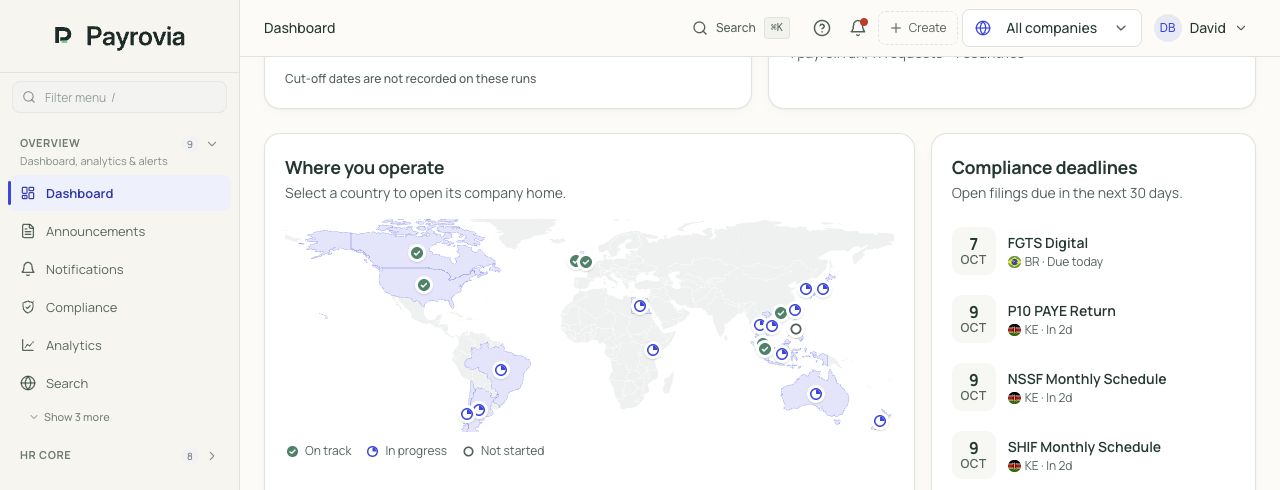
Review headcount, payroll cost, pay dates and open approvals.
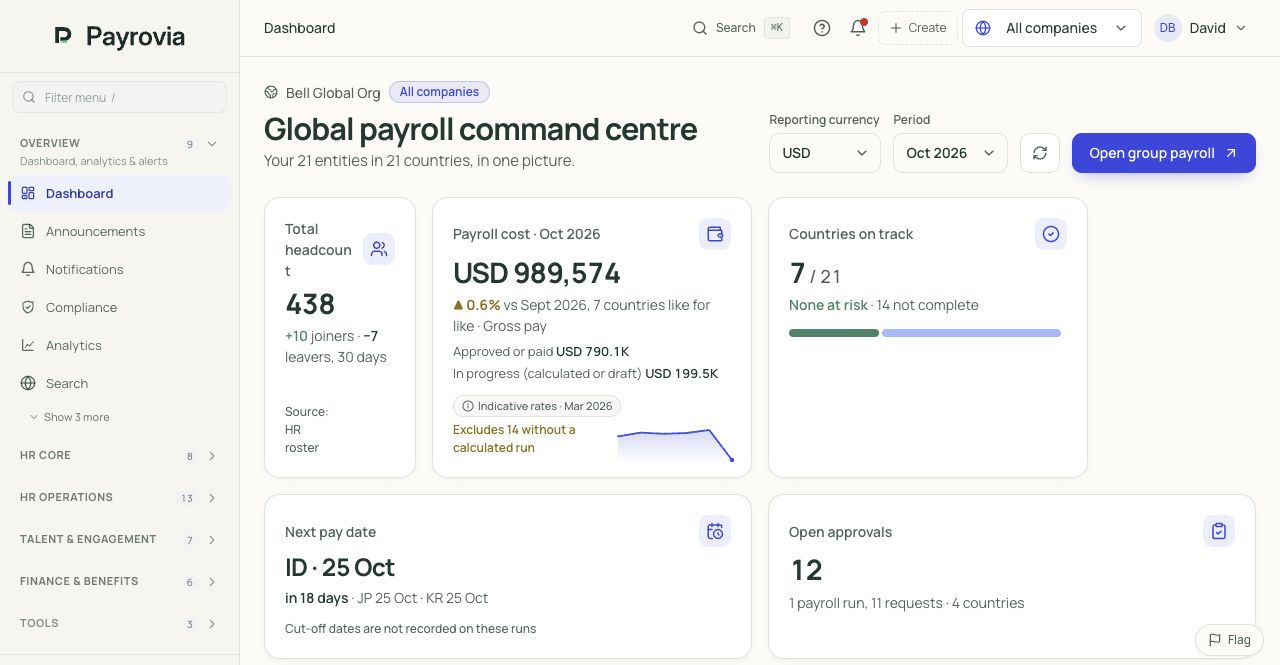
Screens from Payrovia · Bell Global demo data · English interface
A team across state lines
US payroll draws on federal withholding information, state context and the employee's actual working arrangements. Meanwhile, managers are hiring, developing people and responding to changes in their lives. Give those decisions a place in the employment record, with clear review responsibilities when the next pay period arrives.
A change of residence and a change of work location are not always the same event. State and local obligations depend on the circumstances. Keep work state, residence, locality and relevant allocations available for review instead of assuming an address update settles the payroll question.
A business may pay hourly staff weekly and salaried colleagues on another schedule. Hours, benefits and compensation changes still need the right period. A shared employee history helps reviewers understand which decision belongs in which run, without rebuilding the same information for each calendar.
An updated withholding election, retirement deduction or eligible benefit can change take-home pay even when salary is unchanged. Employees need an answer they can follow. Retain the approved change and the relevant payroll detail so HR and payroll can discuss the same result.
US teams in motion
Three common situations show how people decisions and payroll review can stay connected.
A remote employee tells their manager they will work from another state. HR needs the effective date and employment context; payroll needs the work and residence information reviewed before the affected pay period is prepared.
Keep the employee's location information, agreed working arrangement and related documents together. Assign any unresolved question to the person responsible for reviewing the move.
Review time records and the period covered by the change. Confirm the work-state allocation inputs with the responsible reviewer before payroll uses them.
Prepare withholding using maintained W-4 and state information. Review the applicable allocation and local scope, then inspect the employee's result before approving the run.
What changesThe manager's conversation becomes a reviewable payroll change, and the employee can ask questions without retelling the whole story to a different department.
An employee earns a promotion and changes a retirement or eligible benefit deduction. The manager wants to recognize progress, while HR and payroll need the approved salary and deduction information applied to the right cycle.
Keep performance feedback, the new responsibilities and the approved salary decision together. Retain the employee's benefit information and agree the next development priorities.
Check attendance and leave information for the relevant pay window. Resolve any exception before it becomes an unexplained difference in the employee's earnings.
Review the salary change alongside supported 401(k) or Section 125 deductions. Compare the itemized result with the prior period and the approved inputs.
What changesThe promotion has a career record as well as a pay effect, and the employee can understand why take-home pay changed.
A growing US business hires an hourly employee into a weekly payroll group. The first week includes a longer working day and an onboarding question. The manager and payroll reviewer need a shared picture before the first payday.
Follow the accepted offer into onboarding tasks and employee documents. Confirm the approved pay, work-state details, withholding information and the correct pay frequency.
Review clock events and overtime status against the relevant policy. Resolve missing or disputed time with the manager before preparing the weekly run.
Prepare weekly payroll with the applicable federal and state deductions. Make the digital payslip available through the agreed process and retain the first-cycle explanation.
What changesThe new employee starts with a clear record, while HR and payroll can trace the first payslip back to the offer and working time.
People across locations
A shared record should help people grow, not simply keep their payroll details current. Bring hiring, feedback, benefits and everyday support together so a manager can follow an employee's progress across locations and roles.
Track hiring stages, interviews and offers into onboarding. Assign documents, equipment and first-week tasks so remote and on-site colleagues can see what needs to happen before work begins.
Keep goals, one-to-one notes and development plans available between meetings. Use that history when considering an internal move, salary recommendation or the employee's next stretch assignment.
Employees can find pay information, manage benefits and raise HR requests. Give questions an owner so an explanation about a deduction or employment change survives the departmental handoff.
Explore the HR workspace
Follow the decisions behind a hire, a review, a pay recommendation and an everyday request. The employee record carries the context between teams.
Keep the vacancy, interviews and offer together. Carry the new colleague into onboarding, with documents, equipment and tasks assigned to the right people.
The hiring decision becomes the start of the employee record.
One hire. A shared plan for HR, the manager and the new colleague.
Connect goals, regular feedback, review cycles and development plans. Give the next manager the history behind a person's progress, with appropriate access.
A review leads to a useful next step, with an owner and follow-up.
Goals, review history and future opportunities stay connected.
Review salary recommendations alongside budgets, employee history and benefit choices. Record the approval before the change reaches the relevant payroll period.
HR and finance can explain what changed, when and why.
Illustrative recommendation. No salary change is submitted by this screen.
Connect HR requests, documents and employee services to the person. Keep a clear owner, status and response history so a question survives a departmental handover.
The employee sees progress. HR sees the context needed to respond.
Access follows the role. Sensitive case details stay with authorised people.
Illustrative product screens · fictional records and amounts
Useful to everyone
Make the employee record part of daily work. Employees, managers and HR participate through the information and actions relevant to their role.
Employees request leave, find documents, read available payslips and follow goals, with everyday HR questions connected to their employee record.
Managers review requests, approve relevant changes and follow team goals, with employee history available when a decision needs more context.
Illustrative product screens · fictional records and amounts
US payroll detail
Prepare the employee groups and pay periods your business uses, with local scope agreed before rollout. Keep earnings, withholding and employer costs traceable to the records reviewed by your people and payroll teams.
Explore payrollWork with W-4-based federal withholding, state-aware calculations and multistate allocation inputs. Review work state, residence and locality requirements for the specific jurisdictions in your rollout.
Prepare FICA, federal and state unemployment components, and supported retirement or benefit deductions. Keep employee amounts and employer costs available with year-to-date payroll information.
Support weekly, biweekly, semimonthly and monthly pay windows. Review bonus treatment, termination payments and applicable leave payouts with the employee's history and relevant state requirements.
Prepare supported federal and state reporting information, including Forms 941, 940 and W-2. Confirm the required jurisdiction, form version, transmission route and acceptance responsibilities before operational use.
Inside the payroll review
Choose a situation. Follow the source information into an illustrated payslip, then see the checks before release. Local treatment stays with the country and employee.
Compare time with the roster and the approved request. Keep the earning separate so payroll and the employee can follow its source.
Illustrative pay period · USD
Employer costs · separate from net payUSD 280
Check the hours and supporting request.
Review the applicable local treatment.
Approve the payroll version before release.
Work with W-4-based federal withholding, state-aware calculations and multistate allocation inputs. Review work state, residence and locality requirements for the specific jurisdictions in your rollout.
Carry an approved salary change from HR into the right period. Retain the earlier amount and the explanation behind the difference.
Illustrative pay period · USD
Employer costs · separate from net payUSD 280
Confirm the approved employee change.
Check dates, proration and any earlier periods.
Explain the variance before finalising.
Prepare FICA, federal and state unemployment components, and supported retirement or benefit deductions. Keep employee amounts and employer costs available with year-to-date payroll information.
Review employee deductions individually. Keep the employer's costs separate, with the approved basis for any repayment visible.
Illustrative pay period · USD
Employer costs · separate from net payUSD 280
Review tax and contribution inputs.
Check the authorised deduction or repayment.
Reconcile balances and employer costs separately.
Support weekly, biweekly, semimonthly and monthly pay windows. Review bonus treatment, termination payments and applicable leave payouts with the employee's history and relevant state requirements.
Bring leaving dates, remaining pay and applicable settlement items together. Keep clearance, calculation approval and payment responsibilities distinct.
Illustrative pay period · USD
Employer costs · separate from net payUSD 280
Confirm dates and locally applicable amounts.
Review leave and outstanding obligations.
Authorise settlement and follow the payment outcome.
Prepare supported federal and state reporting information, including Forms 941, 940 and W-2. Confirm the required jurisdiction, form version, transmission route and acceptance responsibilities before operational use.
Teaching example only. These are not statutory rates, a quotation or a live payroll calculation. Pay frequency, tax, contributions and final-pay treatment must be confirmed locally.
EOR arrangements
Use Payrovia's central agreement and billing tools to coordinate your own employing entities or separately contracted providers. Review worker assignments, agreed fees and client access together. US payroll connections, employer-cost coverage and automated reconciliation require separate confirmation. Payrovia supplies operating software; the legal employer and each party's responsibilities remain defined by your arrangement.
Define the client, employing entity or provider, countries, fees and responsibilities. Connect each person to the arrangement under which they work.
Connect clients, agreements and worker assignments.
The agreement names the parties and responsibilities; software does not become the legal employer.
Bring HR records, leave, benefits and payroll coordination into the assignment. Give clients access to the information and approvals you have explicitly agreed.
Review assignment costs and fees before issuing invoices.
Local payroll connections and employer-cost coverage are confirmed for your arrangement.
Review employment costs, agreed fees and adjustments by client and period. Keep the supporting assignment detail beside the draft invoice.
Set client access to the relevant people and billing records.
Illustrative USD invoice, not Payrovia pricing. FX evidence, tax, credits and settlement need their own review.
Illustrative EOR workflow. Availability of local connections and automated reconciliation is confirmed separately.
Why teams choose Payrovia
Recruitment, onboarding, performance, development, succession, compensation, benefits and employee services—around the same record.
Connect employee changes, approved time and leave to local payroll review. Give reviewers the information behind the result.
Run one company or connect overseas subsidiaries. Keep local payroll requirements visible while finance reviews the wider business.
Explore the product and detailed features, review pricing and security, or see how implementation works. Book a demo to discuss your people, countries and first rollout.
State-aware withholding and multistate allocation are available, but coverage must be confirmed for your actual work states, resident states and localities. Bring the locations and worker types in your rollout, including remote-work changes. We review the required calculations, registrations and reporting routes without treating all jurisdictions as one uniform rule.
Weekly, biweekly, semimonthly and monthly payroll windows are supported. Set the appropriate employee groups and review periods, then check compensation changes and time inputs against each calendar. Your walkthrough should include one ordinary run and a mid-period change so the setup reflects how your teams are paid.
The current US ACH file format has not been verified for production bank acceptance and is not a ready-to-use direct-deposit route. Payment execution must use a separately confirmed process. Payroll preparation and reporting can be assessed independently; agree the bank format, validation and funding responsibilities before changing how employees receive pay.
No. That determination depends on the actual working relationship and the applicable rules. US employee payroll and supported 1099-NEC reporting are distinct processes. Your team confirms worker classification and the relevant scope before setup; choosing a record type in software does not establish the person's legal status.
A walkthrough for your business
Tell us about your local team and any overseas subsidiaries. We'll focus the demonstration on the HR, timekeeping and payroll work you want to improve.