HR & talent
Connect recruitment, onboarding, documents, performance and development around each employee. Keep benefits, compensation decisions and departure tasks with the people responsible for following them through.
Explore HR
We selected this market using your approximate location. You can change it anytime. Change country / language · Global site
HR, time & payroll in South Africa
Payrovia brings HR, timekeeping and global payroll together for your business in South Africa and its overseas subsidiaries. One employee record connects your people, with local payroll in each country and visibility across the group.

Local teams and overseas subsidiaries. One platform.
One employee record
Hiring, development, everyday work and the final handover. Keep the employee's history together, so each team has the context to act.
Bring the offer, contract, documents and first-day tasks together. Your local HR and payroll teams start with the same employee information.
Book a demo ↗Give people a place for time records, leave and payslips. Managers see requests in the context of the person's employment.
Book a demo ↗Connect goals, feedback, development and compensation decisions. Give every manager a fuller view of the person behind the next review.
Book a demo ↗Coordinate the handover, equipment, documents and final-pay preparation. Keep the people responsible clear about what is complete and what needs review.
Book a demo ↗Local teams and overseas subsidiaries. One platform.
HR & talent ↗Illustrative product concepts with fictional details.
The Payrovia platform
Bring recruitment, development and employee support together with local identity and salary information. Define South African attendance and payroll scope around your employee groups, sector needs and monthly review responsibilities.
Connect recruitment, onboarding, documents, performance and development around each employee. Keep benefits, compensation decisions and departure tasks with the people responsible for following them through.
Explore HRReview daily clock records, leave requests and balances alongside employee information. Agree South African beta scope, simplified accrual treatment and remaining manual steps before rollout.
Explore timekeepingPrepare available PAYE, UIF, SDL and ETI components with employee and employer information. Confirm tax-year scope, employee groups and external banking and submission responsibilities first.
Explore local payrollGive employees a place for requests, documents, available payslips and goals. Managers follow approvals and team development with the same employee context available.
Explore employee servicesLocal payroll. Global oversight.
Run your South African company and overseas subsidiaries on the same platform. Each entity keeps its local payroll requirements, while HR and finance share employee records and review consolidated payroll costs. Start with one company and add countries as your business grows.
Book a demo ↗
See where payroll stands across your companies.
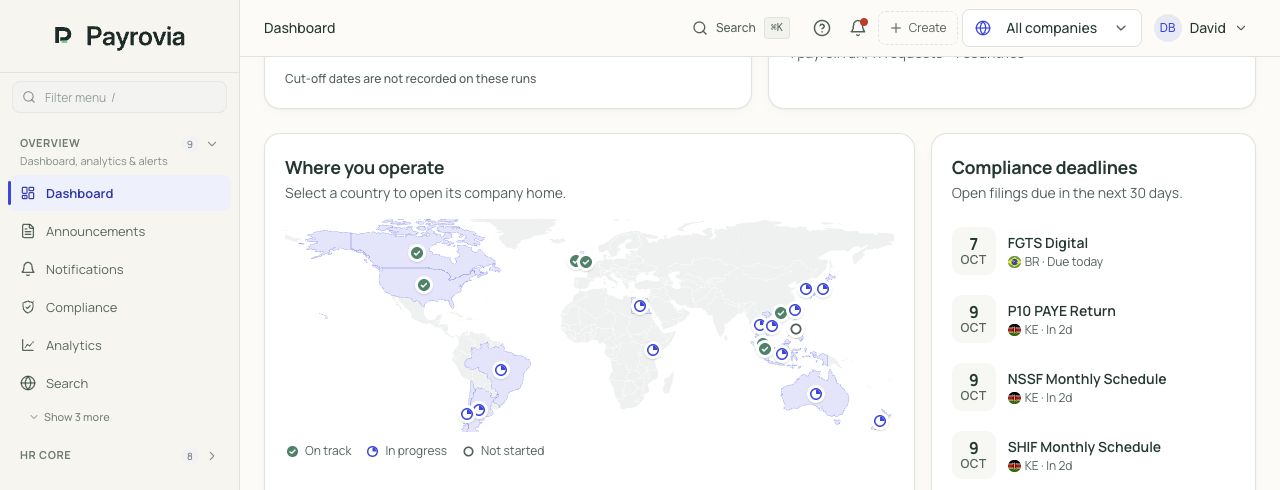
Review headcount, payroll cost, pay dates and open approvals.
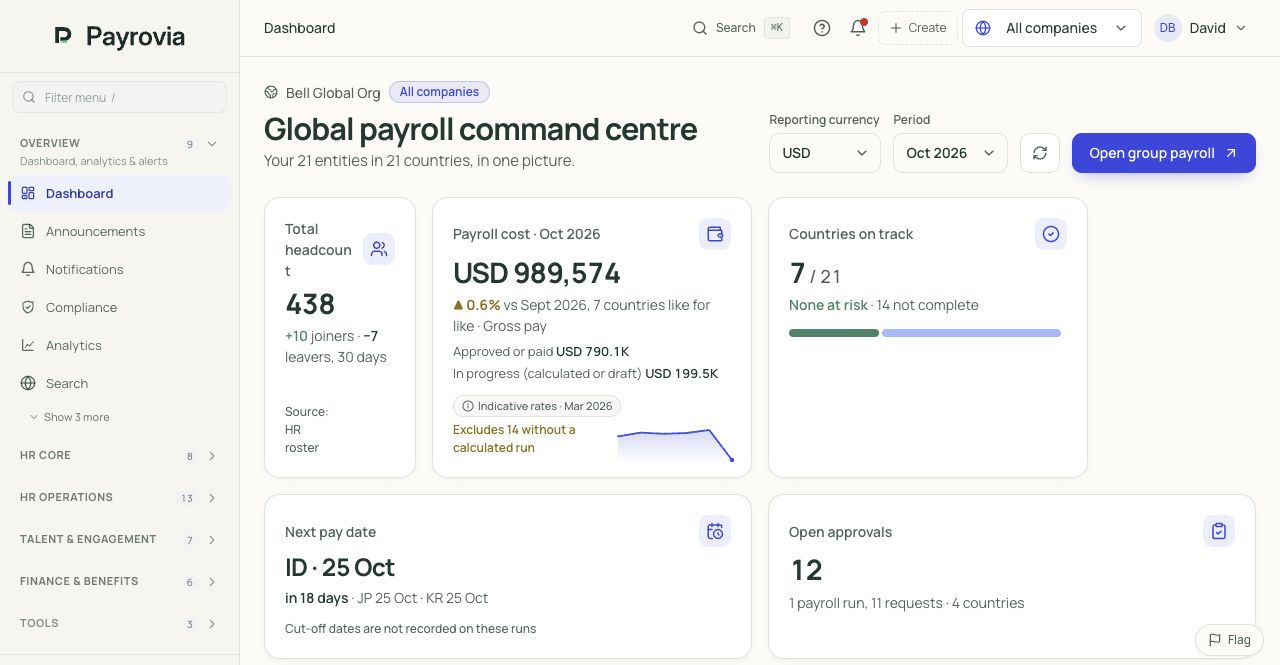
Screens from Payrovia · Bell Global demo data · English interface
The South African working record
SARS payroll administration depends on accurate employee and remuneration information, with PAYE, UIF, SDL and applicable ETI allocations in the employer's monthly declaration. Employment records also support working-time, leave and payslip responsibilities. For a distributed business, the internal challenge is keeping local manager decisions available when HR and payroll review the same person.
A branch hire or change of reporting line should remain connected to employment documents, salary and development history. HR needs a common record while the manager has enough information to support the person and review questions about their recorded working days.
Employees ask about take-home pay, while finance also needs the employer's payroll costs. PAYE, UIF, SDL and ETI have different roles. Reviewers should be able to discuss the relevant components without treating every amount as a deduction from the employee.
A contractual bonus, a bargaining-council requirement or a garnishee order can introduce additional work. The available local tools need to be matched to your business's circumstances, with incomplete processes identified before payroll relies on a standard-looking monthly result.
Practical local examples
These examples show shared HR and available beta local tools. Your team confirms current tax-year requirements, applicable employee circumstances and the steps completed outside the product.
A growing company hires a colleague at another branch. The manager prepares the role, HR collects identity and tax information, and payroll needs an approved salary and a usable employee record for monthly preparation.
Collect identity, SARS tax-reference and approved job information with documents and onboarding tasks. Give the hiring manager a clear part in the new colleague's start.
Use available clock-in, clock-out and daily attendance records. The local manager follows missing or disputed information using the company's actual working arrangement.
Prepare scoped monthly payroll with PAYE, UIF, SDL and applicable ETI context. Review employee and employer information, including the confirmed tax-year treatment, before relying on results.
What changesThe branch employee has a continuing record across HR and payroll. The manager can support the start while the team reviews local identity and monthly pay information.
A company awards a bonus under its agreed compensation arrangement. Employees want to understand the additional amount and tax treatment. HR needs the approval history, and payroll needs to review the bonus separately from regular monthly remuneration.
Keep the approved bonus and supporting decision with employee history. Managers can refer to the relevant performance conversation and the company's agreed compensation terms.
Review daily attendance and approved leave for the period. Resolve record questions with the responsible manager before the team discusses the employee's monthly amounts.
Use the scoped annual-equivalent bonus PAYE preparation and examine the proposed result. Confirm current tax-year requirements and the bonus arrangement before approving the additional payment.
What changesThe team can discuss the bonus using its approved compensation context and reviewed tax preparation. A contractual additional payment remains distinguishable from the employee's regular monthly salary.
An employee leaves with unused leave and a final working period to review. HR coordinates handover and clearance, while payroll needs the appropriate employee circumstances and confirmed inputs for the available leaving-payment preparation.
Record leaving dates and relevant documents, then assign clearance and knowledge-transfer work. Retain employment history so the responsible team can review the departure's circumstances.
Check daily attendance and approved absence through the leaving date. Confirm unused-leave inputs separately where the local balance calculation needs your company's cycle-based review.
Review the scoped leave-payout, notice and applicable severance components. Confirm the remaining administrative steps with your team; severance administration remains a manual process.
What changesThe final-pay discussion has reviewed inputs and an employment history. HR tasks stay visible, and the team knows which settlement activities it must still complete manually.
People & development
Give every team access to the people tools relevant to its responsibilities. Shared HR connects recruitment, development and support across your company, with managers involved in the employee's continuing career and HR following the record.
Follow vacancies, applicants, interviews and offers into onboarding. Assign document and equipment work, then use early checkpoints so HR and the local manager can follow the employee's first weeks.
Maintain goals, feedback, reviews and development plans. Use succession candidates and readiness discussions to consider future roles, with employee history available when managers propose supported merit or salary changes.
Manage HR cases, benefits information, employee documents, signatures and asset requests. Set owners and access by responsibility, while leaders review headcount, employee changes and costs across their organisation.
Explore the HR workspace
Follow the decisions behind a hire, a review, a pay recommendation and an everyday request. The employee record carries the context between teams.
Keep the vacancy, interviews and offer together. Carry the new colleague into onboarding, with documents, equipment and tasks assigned to the right people.
The hiring decision becomes the start of the employee record.
One hire. A shared plan for HR, the manager and the new colleague.
Connect goals, regular feedback, review cycles and development plans. Give the next manager the history behind a person's progress, with appropriate access.
A review leads to a useful next step, with an owner and follow-up.
Goals, review history and future opportunities stay connected.
Review salary recommendations alongside budgets, employee history and benefit choices. Record the approval before the change reaches the relevant payroll period.
HR and finance can explain what changed, when and why.
Illustrative recommendation. No salary change is submitted by this screen.
Connect HR requests, documents and employee services to the person. Keep a clear owner, status and response history so a question survives a departmental handover.
The employee sees progress. HR sees the context needed to respond.
Access follows the role. Sensitive case details stay with authorised people.
Illustrative product screens · fictional records and amounts
Useful to everyone
Make the employee record part of daily work. Employees, managers and HR participate through the information and actions relevant to their role.
Employees request leave, find documents, read available payslips and follow goals, with everyday HR questions connected to their employee record.
Managers review requests, approve relevant changes and follow team goals, with employee history available when a decision needs more context.
Illustrative product screens · fictional records and amounts
South African payroll detail
The beta tools prepare local monthly records and component detail. Agree the current tax-year scope and employee needs, then review the calculation before completing the separate banking and authority processes.
Explore payrollPrepare available PAYE withholding and UIF components, employer SDL and applicable ETI calculations. Keep employee deductions, employer costs and incentive context distinct when discussing the monthly result with HR and finance.
Maintain employee identity and SARS tax-reference information with company CIPC, PAYE, UIF and relevant SDL/SETA or COIDA registrations. Keep these inputs connected to the employment documents and approved compensation record.
Use daily clock records and available leave requests, balances and approvals. Contractual bonus and final-pay preparation require scoped review; cycle-based leave accrual is simplified and severance administration remains manual.
Prepare available EMP201 drafts, itemized payslip outputs and bank-batch CSV information. Bank upload, SARS submission and return-file review remain manual; further reconciliation and tax-certificate output requirements need separate confirmation.
Inside the payroll review
Choose a situation. Follow the source information into an illustrated payslip, then see the checks before release. Local treatment stays with the country and employee.
Compare time with the roster and the approved request. Keep the earning separate so payroll and the employee can follow its source.
Illustrative pay period · ZAR
Employer costs · separate from net payZAR 2,100
Check the hours and supporting request.
Review the applicable local treatment.
Approve the payroll version before release.
Prepare available PAYE withholding and UIF components, employer SDL and applicable ETI calculations. Keep employee deductions, employer costs and incentive context distinct when discussing the monthly result with HR and finance.
Carry an approved salary change from HR into the right period. Retain the earlier amount and the explanation behind the difference.
Illustrative pay period · ZAR
Employer costs · separate from net payZAR 2,100
Confirm the approved employee change.
Check dates, proration and any earlier periods.
Explain the variance before finalising.
Maintain employee identity and SARS tax-reference information with company CIPC, PAYE, UIF and relevant SDL/SETA or COIDA registrations. Keep these inputs connected to the employment documents and approved compensation record.
Review employee deductions individually. Keep the employer's costs separate, with the approved basis for any repayment visible.
Illustrative pay period · ZAR
Employer costs · separate from net payZAR 2,100
Review tax and contribution inputs.
Check the authorised deduction or repayment.
Reconcile balances and employer costs separately.
Use daily clock records and available leave requests, balances and approvals. Contractual bonus and final-pay preparation require scoped review; cycle-based leave accrual is simplified and severance administration remains manual.
Bring leaving dates, remaining pay and applicable settlement items together. Keep clearance, calculation approval and payment responsibilities distinct.
Illustrative pay period · ZAR
Employer costs · separate from net payZAR 2,100
Confirm dates and locally applicable amounts.
Review leave and outstanding obligations.
Authorise settlement and follow the payment outcome.
Prepare available EMP201 drafts, itemized payslip outputs and bank-batch CSV information. Bank upload, SARS submission and return-file review remain manual; further reconciliation and tax-certificate output requirements need separate confirmation.
Teaching example only. These are not statutory rates, a quotation or a live payroll calculation. Pay frequency, tax, contributions and final-pay treatment must be confirmed locally.
EOR arrangements
Payrovia provides operating software for relationships with your employing entities or separately agreed providers. Maintain South African worker assignments, agreements and client access with central billing by client and period. Your arrangement determines the legal employer. Local statutory estimates and automatic reconciliation to finalized South African payroll require separate confirmation for the scope you intend to operate.
Define the client, employing entity or provider, countries, fees and responsibilities. Connect each person to the arrangement under which they work.
Connect workers and documents to the relevant agreement.
The agreement names the parties and responsibilities; software does not become the legal employer.
Bring HR records, leave, benefits and payroll coordination into the assignment. Give clients access to the information and approvals you have explicitly agreed.
Define client information and approval permissions.
Local payroll connections and employer-cost coverage are confirmed for your arrangement.
Review employment costs, agreed fees and adjustments by client and period. Keep the supporting assignment detail beside the draft invoice.
Review assignment costs, fees and invoice history.
Illustrative USD invoice, not Payrovia pricing. FX evidence, tax, credits and settlement need their own review.
Illustrative EOR workflow. Availability of local connections and automated reconciliation is confirmed separately.
Why teams choose Payrovia
Recruitment, onboarding, performance, development, succession, compensation, benefits and employee services—around the same record.
Connect employee changes, approved time and leave to local payroll review. Give reviewers the information behind the result.
Run one company or connect overseas subsidiaries. Keep local payroll requirements visible while finance reviews the wider business.
Explore the product and detailed features, review pricing and security, or see how implementation works. Book a demo to discuss your people, countries and first rollout.
The current scope includes partially ready monthly calculations, local employee records, itemized payslip outputs, daily clock records and leave tools. We agree tax-year requirements and representative employee cases before adoption. Local scheduling, timesheets and biometric workflows remain pending, while leave cycles and some departure administration need additional review.
Available calculations distinguish PAYE, UIF, employer SDL and applicable ETI context. Your team can review component detail with the employee record and period information. We confirm which employee cases and employer obligations are in scope, so a payroll question can be discussed using the relevant prepared amounts.
EMP201 drafts and bank-batch files support preparation, followed by manual submission and upload steps. Return-file review is also manual. We confirm your bank format, authority route and operator responsibilities; EMP501 and employee tax-certificate requirements need separate scope confirmation. Preparation does not establish accepted filing or completed payment.
Those local processes remain pending and should not be assumed within the monthly calculation. We review your sector, contract requirements and any additional deductions before agreeing a scope. Contractual bonus preparation and available final-pay components also need confirmed tax-year inputs, with remaining manual work identified for your team.
A walkthrough for your business
Tell us about your local team and any overseas subsidiaries. We'll focus the demonstration on the HR, timekeeping and payroll work you want to improve.