01 / HR & TALENT
Support the whole employee relationship.
Recruitment, onboarding, performance, succession, compensation, benefits and employee services, connected to the same employee record.
Explore HR & talent →
HR, payroll & timekeeping
Hire, develop and support your people. Plan their time and run local payroll. All around one employee record, for one company or a global group.
One company in one country, or a business across borders.



Try an everyday workflow. See what moves between your people, HR and payroll.
01 / HIRE & ONBOARD
An accepted offer becomes a shared plan. HR checks the employee details, the manager prepares the welcome, and payroll has the starting information.
Explore hiring & onboardingOne step remaining
Illustrative workflow with fictional data. No real employee record is changed.
02 / TIME & LEAVE
An employee requests two days away. The manager reviews it, and the approved dates stay with the employee record.
Explore time & attendanceAwaiting review
Illustrative workflow with fictional data. No real employee record is changed.
03 / PAYROLL REVIEW
A salary change has an effective date and an owner. Follow the approved HR decision into payroll review, with the explanation attached.
Explore payrollReview required
Illustrative workflow with fictional data. No real employee record is changed.
04 / EMPLOYEE SUPPORT
An employee asks for an employment document. HR sees who owns the request and the information needed to respond.
Explore employee servicesOpen request
Illustrative workflow with fictional data. No real employee record is changed.
More of your business, together
01 / HR & TALENT
Recruitment, onboarding, performance, succession, compensation, benefits and employee services, connected to the same employee record.
Explore HR & talent →02 / TIME & LEAVE
Plan shifts, record attendance and manage leave. Review time corrections, overtime and shift swaps with the people responsible.
Explore time & attendance →03 / LOCAL PAYROLL
Review earnings, deductions and contributions. Manage regular, bonus and final pay with country-specific calculations and approval controls.
Explore payroll →Your business across borders
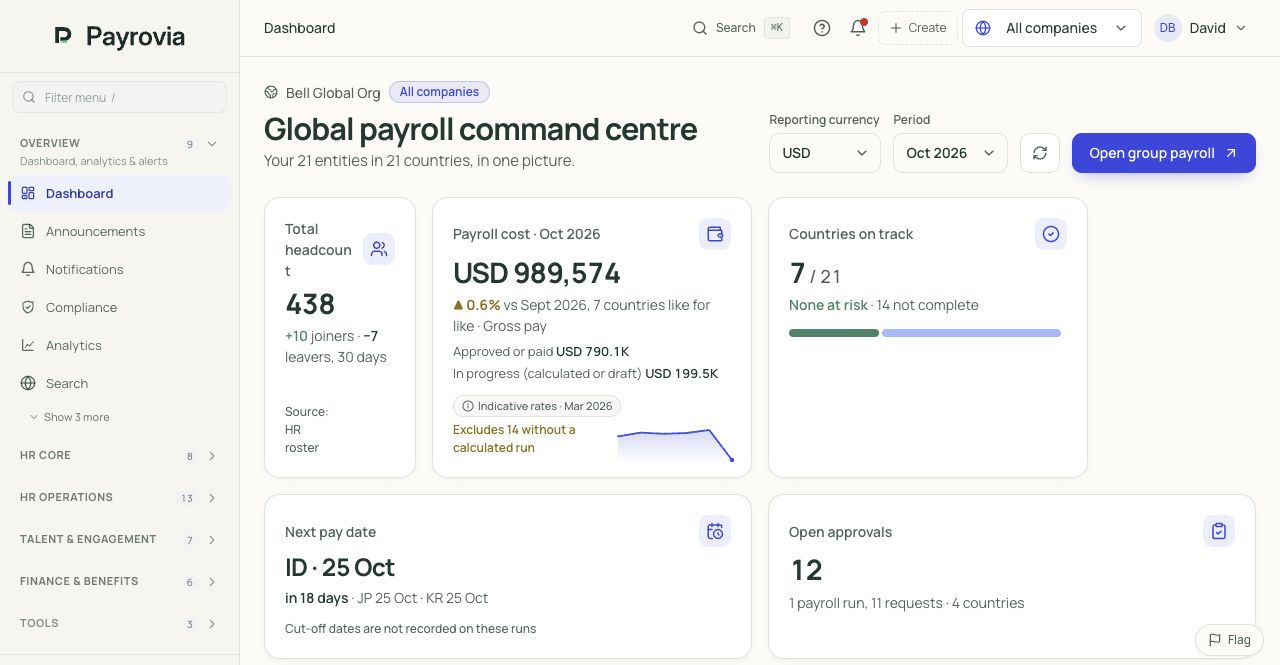
See your people, payroll costs and upcoming pay dates across your group. Find the countries and approvals that need attention, then open the local detail.
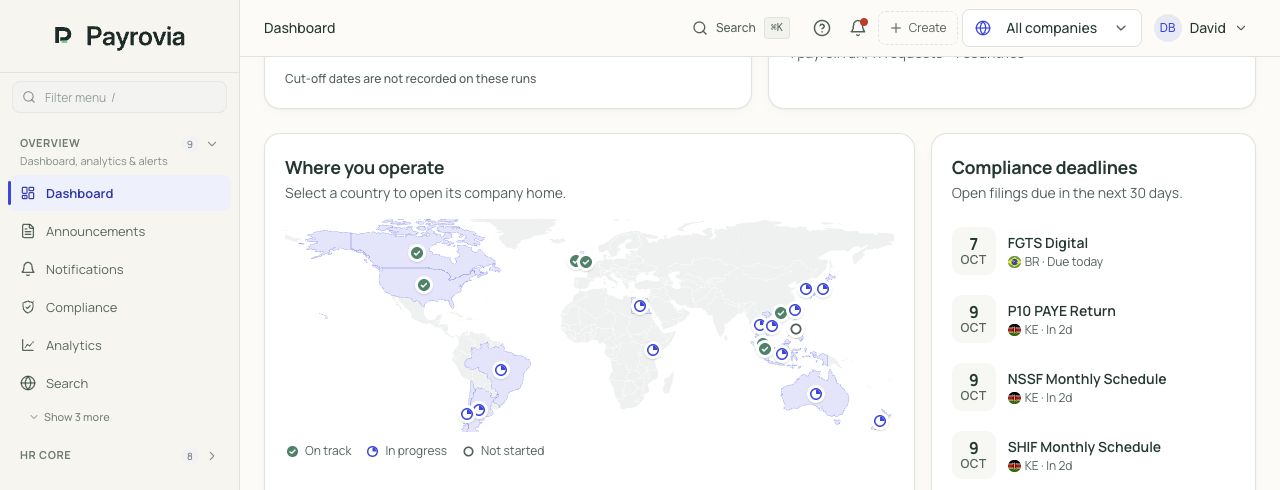
See where payroll stands across your companies.
Review headcount, payroll cost, pay dates and open approvals.
Screens from Payrovia · Bell Global demo data · English interface
A country map shows which payrolls are on track, in progress or not yet started.
Review payroll in a reporting currency, with approved amounts separate from work in progress and the exchange-rate basis shown.
See approaching pay dates and outstanding approvals without opening each company separately.
Actual product screens using demo data. Country and output scope confirmed before rollout.
See Payrovia with your team ↗The world works locally
Bring your people together without losing the local detail. Explore working patterns, leave, payroll calculations and country-specific outputs.
Keep employee details and loan arrangements connected to the record.
Review attendance, overtime, night work and leave with the schedule.
Prepare recurring pay, bonuses and deductions with local calculation detail.
Country and workflow availability confirmed before rollout. See the country page for payment and filing details.

Keep NRIC or FIN details with job history, benefits and employee documents.
Plan rotations, review swaps and follow leave and overtime requests.
Bring contribution and bonus treatment into the payroll review.
Country and workflow availability confirmed before rollout. See the country page for payment and filing details.

Manage employee requests, benefit choices and employment information together.
Account for local holiday context when planning rosters and reviewing hours.
Review statutory contributions and deductions alongside the employee result.
Country and workflow availability confirmed before rollout. See the country page for payment and filing details.
Keep recruitment, reviews and employee requests alongside employment history.
Plan work and review absence information with the relevant pay period.
Review deductions and pension details; confirm reporting and payment routes.
Country and workflow availability confirmed before rollout. See the country page for payment and filing details.

Maintain the employment information and province relevant to the person.
Review working time and vacation information before the payroll period closes.
Prepare the local calculation and outputs, with manual authority submission.
Country and workflow availability confirmed before rollout. See the country page for payment and filing details.
Country, worker type and output availability are confirmed with you before rollout.
Deep payroll, with clear controls
Approved time. A pay rise. A loan repayment. A departure. Follow the information into the payslip, and see what your team checks before it is released.
Explore the full payroll capability ↗Follow overtime from the manager's time review into a separate earning. Payroll can see where the amount came from before approving it.
01 THE SOURCE
02 THE PAYSLIP
PreviewSeptember 2026 · PHP
03 THE REVIEW
Check the hours against the roster and approved overtime request.
Review the overtime treatment for this employee and country.
Approve the resulting payroll version before publishing or payment.
8 approved hours remain linked to the period being paid. Corrections return to the time review.
For this example only: 8 hours × ₱250 = ₱2,000. This is not a statutory overtime rate.
The payslip identifies overtime separately from basic salary and allowances.
Carry an approved salary change from HR into the relevant pay period. Keep the previous amount, effective date and payroll impact available for review.
01 THE SOURCE
02 THE PAYSLIP
PreviewSeptember 2026 · PHP
03 THE REVIEW
Retain the approved salary and the date it takes effect.
Check whether the change belongs to this run, a partial period or an earlier period.
Explain the difference from the previous payslip before finalising.
This example starts on the first day of the pay period, so the full new basic salary is shown.
A mid-period change needs the relevant proration and eligible dates reviewed.
A backdated change can require a retroactive adjustment or off-cycle payment.
Review employee contributions, tax and loan repayments together. Keep employer costs separate so finance can see the cost of employment as well as net pay.
01 THE SOURCE
02 THE PAYSLIP
PreviewSeptember 2026 · PHP
03 THE REVIEW
Inspect contributions, tax and the approved loan instalment individually.
Review the employer's contributions separately from take-home pay.
Keep the repayment and payroll records available when checking balances.
The employee's country, identifiers and payroll setup determine the applicable treatment.
The approved schedule supplies the instalment for payroll review; changes need the loan record updated.
Illustrative employer cost: ₱2,800, giving ₱45,800 total employment cost. It is not deducted from the employee's net pay.
Bring the departure date, remaining pay, eligible leave conversion and applicable bonus accruals into a final-pay review. Keep clearance and settlement responsibilities visible.
01 THE SOURCE
02 THE PAYSLIP
PreviewSeptember 2026 · PHP
03 THE REVIEW
Confirm dates, eligible amounts and outstanding employee obligations.
Track equipment, documents and handover tasks alongside the departure.
Approve final pay and record the payment outcome through the agreed process.
Review salary up to the leaving date and the applicable accrual or separation items.
Confirm which leave is eligible for conversion and which deductions have an approved basis.
This example is still a preview. Clearance tracking does not automatically authorise a deduction or confirm payment.
Built for the whole payroll operation.
RUN YOUR OWN EOR ARRANGEMENTS
For businesses using their own employing entities or agreed local providers. Bring the commercial terms, local people and central client billing together in Payrovia.
Explore EOR arrangementsDefine the client, countries, service model and fees. Connect each worker to the agreement and the company that employs them.
Operations knows who belongs where. Finance knows which terms to use.
One agreement. Three connected assignments.Each assignment carries its employee, company and local cost details into the working relationship.
Keep benefits, leave and expenses with the employee record. Coordinate local HR and payroll responsibilities through the employing company.
Choose the worker information they can see and the time or leave requests they can approve.
Customer Success Specialist · Philippines
Health plan linked to Maya's record
2 days requested · 24–25 September
PHP 2,400 · client meeting travel
Client portal access is deliberate. Employee details, salary visibility and approval permissions follow the access you configure.
Prepare billing by client, period or agreement from assignment costs and agreed terms. Keep the detail behind the total available for review.
Review partial periods, minimum fees and FX evidence. Track credit notes and settlement in the same workflow.
The $1,200 fee exceeds the $1,000 monthly minimum. Local costs are shown in USD; live billing retains the conversion rate and source.
Employee & manager self-service
Request leave, submit expenses, find documents, check payslips and ask HR for help.
Review requests, organise the team, approve changes and follow up on goals and performance.
Manage hiring, employee changes, review cycles and payroll with shared records and approval history.
Review salary budgets, workforce costs and payroll results across companies and countries.
Business control & visibility
Review headcount, positions and workforce changes alongside salary budgets and payroll costs. Use company and group reporting to support the next decision.
Explore reporting & planning →Set approval routes and role permissions for employee information, time off and pay changes. Keep a record of who reviewed each decision.
Explore access & controls →Start with the features and country requirements you need. Agree the data, training, checks and responsibilities before launch.
Plan your implementation →Tell us where the work gets difficult. We'll tailor a walkthrough to your people, countries and priorities.
Book a demo ↗ Business details only. Please do not share employee, salary, bank or tax data.Yes. Tell us which records, hiring, development or employee-service workflows you need. Your proposal confirms the features, implementation work and country scope included.
Availability is confirmed for your country, worker types, pay cycle and output channels before implementation. A country page is an invitation to discuss scope.
Yes. One employee record can support a single company in one country or a group operating across countries. The setup reflects your structure, access requirements and local workflows.